


PJSEC CYBERADVENT – Daily Cybersecurity Challenges

How can you become a programmer if, at first, it’s hard to even figure out what you need to learn? Instead of looking for a single technology that will open all doors, it’s better to approach preparing for the profession as a gradual process of acquiring skills and becoming self-sufficient in performing specific tasks. This track approach to learning will first allow you to understand simple instructions, then to create a working application, and finally to gain the skills to test, develop, and explain it to others.
To start, it’s a good idea to choose a small task whose results can be easily evaluated. Let’s take a student initiative to plant seeds as an example. As part of this initiative, participants bring labeled packages, and the organizers need information about the available species and the number of remaining packages. The first program doesn’t need to support accounts, notifications, or complex forms. It just needs to allow users to add an item, update its quantity after it’s been distributed, and display the current inventory.
Even before writing any code, the first questions arise here—questions we need to answer beforehand. Is it possible to dispense more packages than are available? What should we do if someone doesn’t provide the name of the plant? Do two entries with the same name refer to the same batch? We document these rules in plain language, and only then do we translate them into instructions.
This is a good starting point for anyone wondering how to get started with programming. There’s no need to learn the entire set of technologies right away; we can focus on a single workflow in which the user submits data, the program checks it, performs an operation, and displays the result. The tools you choose should meet the needs of the project, rather than simply serving to add to a list of terms you’ve learned.
The choice of one ofthe most popular programming languages and technologies to learn can be linked to the type of solutions you plan to develop. Python is suitable for automation and data processing, JavaScript for interactive web applications, and Java and C# for developing business systems. However, you shouldn’t treat this decision as a commitment for your entire career. At the beginning, it’s better to see a small project through to completion than to learn a dozen or so languages without writing your own solution.
So, as a practical rule of thumb to start with, it’s simple: one main language, one development environment, and one project developed in stages. It’s best to add a new library or framework—that is, ready-made tools that make it easier to build applications—once you know what problem they’re supposed to solve.
The initial learning plan should be built around basic operations: recording values, making decisions, repeating actions, and breaking down a solution into smaller parts. In the example of planting seeds, the number of packets will be a value stored in the program; a condition will prevent the dispensing of unavailable goods; and a function will allow the same operation to be performed repeatedly without rewriting the instructions. In this way, variables, conditional statements, loops, and functions cease to be isolated definitions.
The next stage should involve organizing larger amounts of information, saving it between sessions, and handling invalid data. The plan should also include algorithms and data structures, starting with simple tasks such as searching for items, sorting lists, or detecting duplicates. Instead of simply memorizing names without applying them, you can compare two ways of solving the same problem.
A good test is to change the requirements. If the program records the number of packages, the next exercise could involve adding information about their expiration dates. Do you know where to make the change and which existing operations need to be rechecked? Learning to program from scratch in this way focuses on developing skills, not on checking off chapters.
It’s a good idea to assign three tasks to each topic you learn. First, recreate the solution without looking at the answer; next, modify it; and finally, explain it in your own words. After practicing how to save data, let’s change its format or add handling for missing values. If a minor modification requires going back to the entire set of instructions, that’s a sign that you need to analyze that section again.
In our daily study plan, let’s also set aside time for learning the material, independent practice, and evaluating our results. A typical session might end with a brief note about what’s already working, what we still don’t understand, and what the next step will be. This kind of record provides a concrete starting point for our next attempt at the project.
What’s most important here, however, isn’t so much how quickly you can learn to program, but rather determining how you’ll be able to recognize your progress. Were you able to find the cause of the error on your own? Does the new function also work for an empty list? Can someone else run the application based on the description you provided? These are more useful criteria than the number of hours spent learning.
To avoid—or at least minimize— mistakes made by novice programmers, such as skipping tests, copying code without understanding it, and neglecting to analyze bugs, it’s a good idea to dedicate separate sessions to exercises that complement their learning. This could involve, for example, deliberately seeking out situations in which one’s own solution might fail. This isn’t about random clicking, but about testing specific assumptions.
In the seed-planting app, let’s try to issue a package when the stock is zero, enter a negative number, or add an item without a name. For each scenario, first define the expected behavior, and only then compare it with the result. After fixing the bug, it’s also a good idea to keep the corresponding test so you can check the same scenario again the next time a change is made.
You should also include development tools such as a debugger, the Git version control system, and documentation for the libraries you’re using in your exercises. To start, you can set yourself small tasks, such as stopping program execution before an incorrect operation, checking the contents of a variable, saving changes to the repository, or reverting to a previous version. Keep in mind that knowing a particular tool should mean being able to perform the necessary actions with it, not just recognizing its name.
How can AI be used in programming? AI assistants can help with writing code, creating tests, and generating documentation, but their suggestions need to be verified, as they may contain logical errors or vulnerabilities. When learning, it’s therefore a good idea to distinguish between getting help to understand a concept and having the tool complete the entire task for you. First, try to describe the problem on your own and attempt to solve it yourself; only then should you ask the tool for guidance.
For example, we don’t have to order a complete seed-planting module right away; instead, we can first ask for clarification on any ambiguities in the prepared requirements. The next step will be to determine on our own how the application should behave in each of the described situations. The proposed model should be treated as material for evaluation, not as a final specification.
It’s also impossible not to mention“vibe coding” and its significance for programmers—an approach in which the desired behavior is described in natural language, and AI generates the code. For learning purposes, however, it’s a good idea to set your own limits; after all, if we can’t explain or modify the solution we’ve received, we can’t yet consider the topic mastered. The result visible on the screen shouldn’t replace verifying what we’ve actually learned.
Of course, it’s a good idea to combine independent study with a structured academic education. The curriculum for the “computer science ” program atPJAIT combines theoretical training with projects and lab work and emphasizes the development of teamwork skills. Therefore, what matters for a candidate is not only what they already know, but also their willingness to work systematically on new topics.
Our own projects don’t have to compete with our studies for our attention. You can treat them as a place to test the methods you’ve learned—for example, by redesigning how data is stored, refining tests, or justifying your choice of algorithm. It’s important to combine two perspectives: how to implement a solution and why it works the way it does.
Our university now offers a separate program: part-time —an online degree program in computer science. Course materials are available through the Edux system and can be studied at your own pace; however, it’s important to note that the program includes a mandatory exam session and on-campus meetings full-time. Therefore, you should not plan this track on the assumption that you will never need to be physically present on campus. When balancing your studies with work or other responsibilities, you must factor in both the time needed for independent assignments and the ability to travel to campus on the required dates.
A portfolio should ideally be structured in a way that allows viewers to understand not only the end result but also the author’s working process. For each project, it’s a good idea to describe the problem, area the features implemented, setup instructions, testing methods, and known limitations. If the application was developed as part of a team or with AI support, you should clearly indicate your own contribution.
A helpful way to test your readiness for a technical interview is to present your project to someone who hasn’t seen it before. Can you briefly explain its purpose, demonstrate the data flow, and justify a single design decision? And most importantly—can you explain any shortcomings they point out without hiding behind the fact that the solution is the result of self-study? You can treat this presentation as another exercise and use the audience’s questions to supplement your documentation.
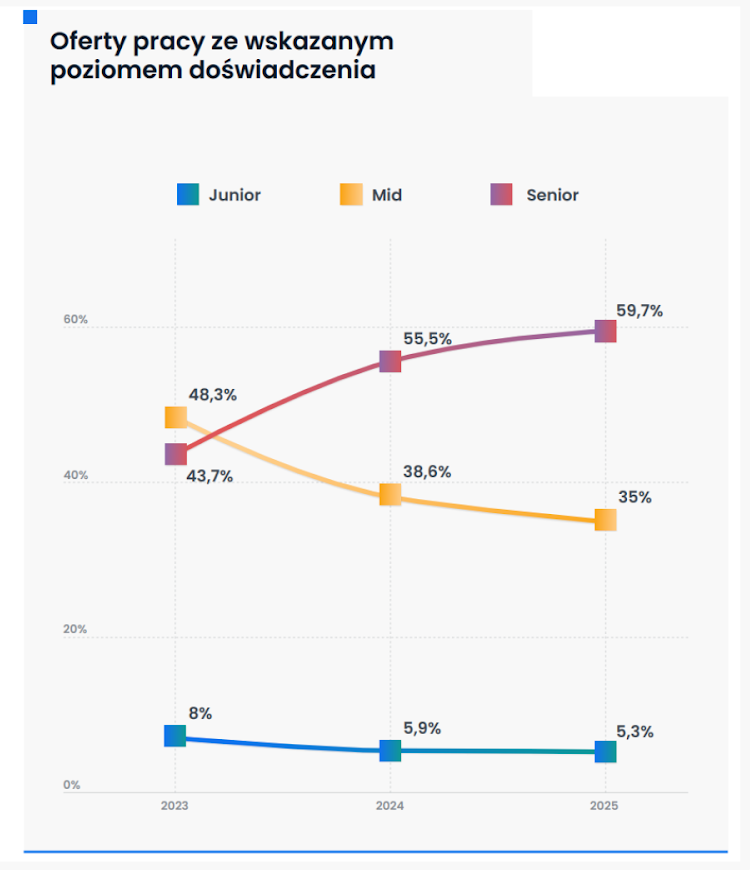
Planning your entry into the profession also requires a realistic assessment of the market. According to the No Fluff Jobs report on the IT market in Poland for 2025/2026, junior positions accounted for about 5% of job postings, despite an improvement in the overall economic situation. However, this data should not be treated as a forecast of the outcome of a specific hiring process. It makes more sense to use it as an argument for developing projects, seeking internships, and gradually building the skills required for the positions that interest you.
When choosing a career path, it will also be helpful to know whichspecialists are in highest demand and which IT positions offer the highest salaries—based on a market report covering, among other things, systems architecture, security, and data. But again—you shouldn’t equate these salary ranges for entire specializations with the expected salary of someone just starting their career. It’s better to treat them as a starting point for learning about different types of work and the responsibilities associated with them.
We don’t have to set a single deadline by which learning must be completed; instead, we can set successive levels of independence, devote time to writing another function, building a small application, finding a bug, preparing a test, or collaborating on a joint project. Each of these stages provides an opportunity to test specific skills. And it doesn’t require pretending that you already know the answer to every question.
To start with, all you need is a well-defined problem and a willingness to consistently develop a solution. Later, we broaden our perspective to include new technologies, academic knowledge, and team experiences. The goal in and of itself should not be simply to produce more and more code, but rather to gain a better understanding of what is being created, who it serves, and how to verify that it works as intended.